AI Smart Forms · Practice management for law firms

Describe it. AI drafts it. Your client signs it.

LawyerPara is your AI paralegal. Smart Forms write legal documents from one prompt, collect e-signatures through a secure link and file the signed PDF on the matter. Plus matters, billing and your firm website.

No credit card required · Free trial · No lock-in contract

15 AI tools built in
4 AI staff agents
4 Payment gateways
6 Tabs in every matter
4+ Languages, add more
Signature features

Five features worth a closer look

LawyerPara covers the everyday practice tools. These five are where your AI paralegal saves the most time.

01 Flagship
Flagship · Smart Forms

Draft, sign and file documents

Describe the document in plain English and LawyerPara writes the draft, including the fields to fill in. Share a secure link, collect answers and e-signatures, send it back for changes, and the signed PDF lands on the matter.

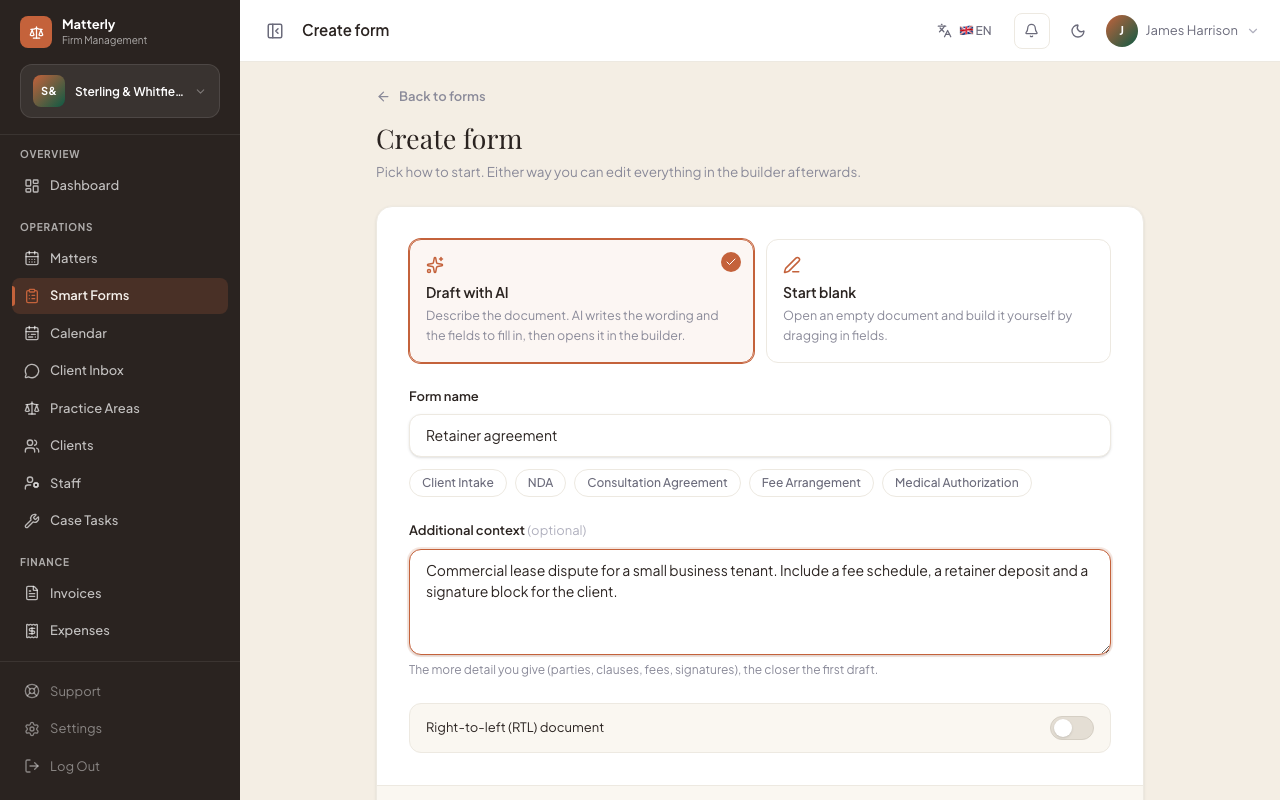
  1. Describe it
    1

    Describe it

    Type what the document needs to cover. AI drafts the wording and the fields to fill in.

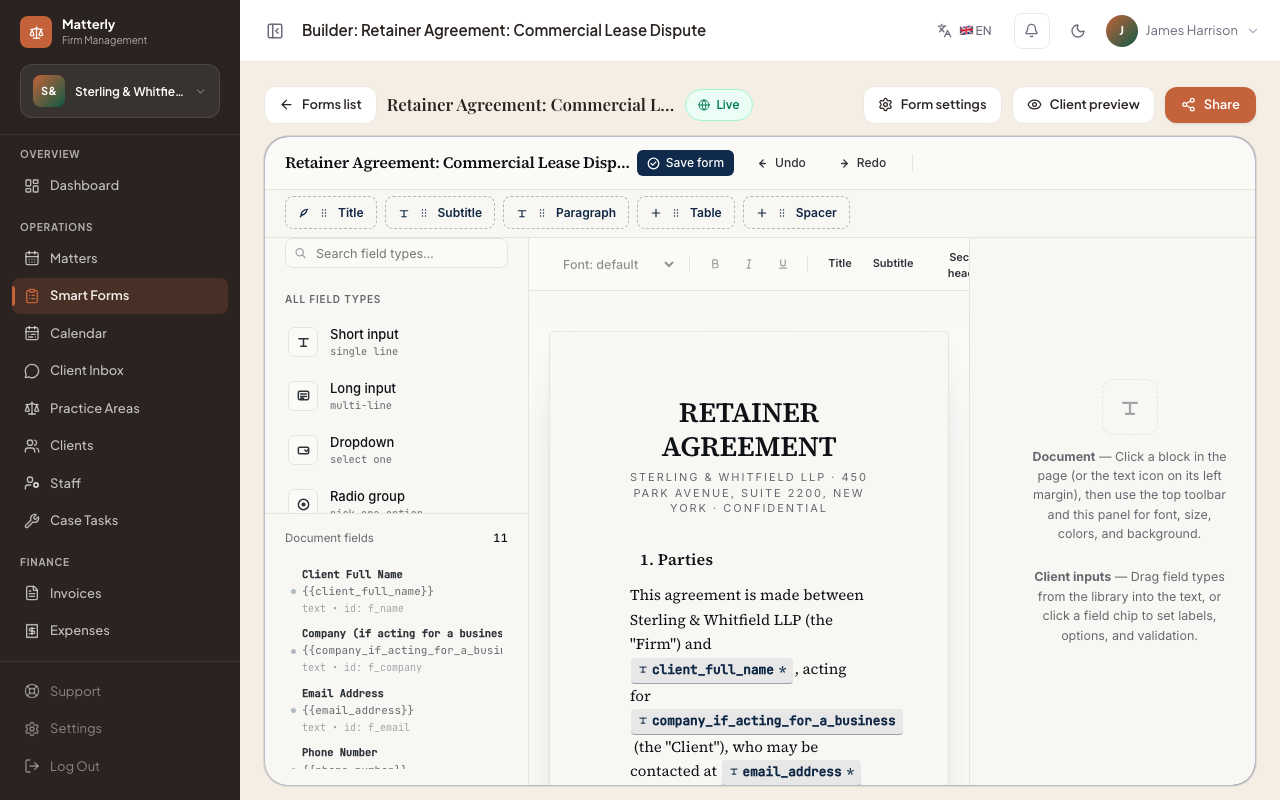
  2. Edit in the builder
    2

    Edit in the builder

    Adjust clauses, fields and signers in a live document editor.

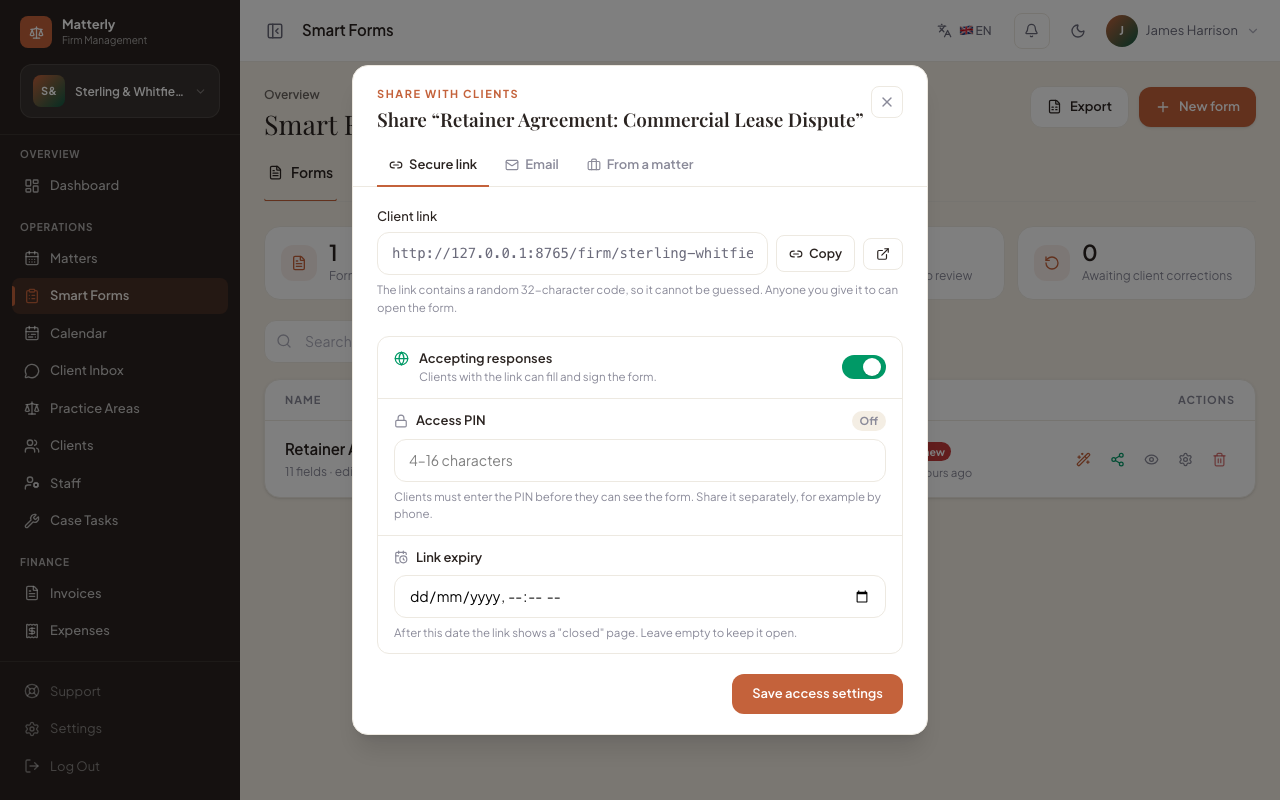
  3. Share a secure link
    3

    Share a secure link

    Send it from the matter, with an optional PIN and an expiry date.

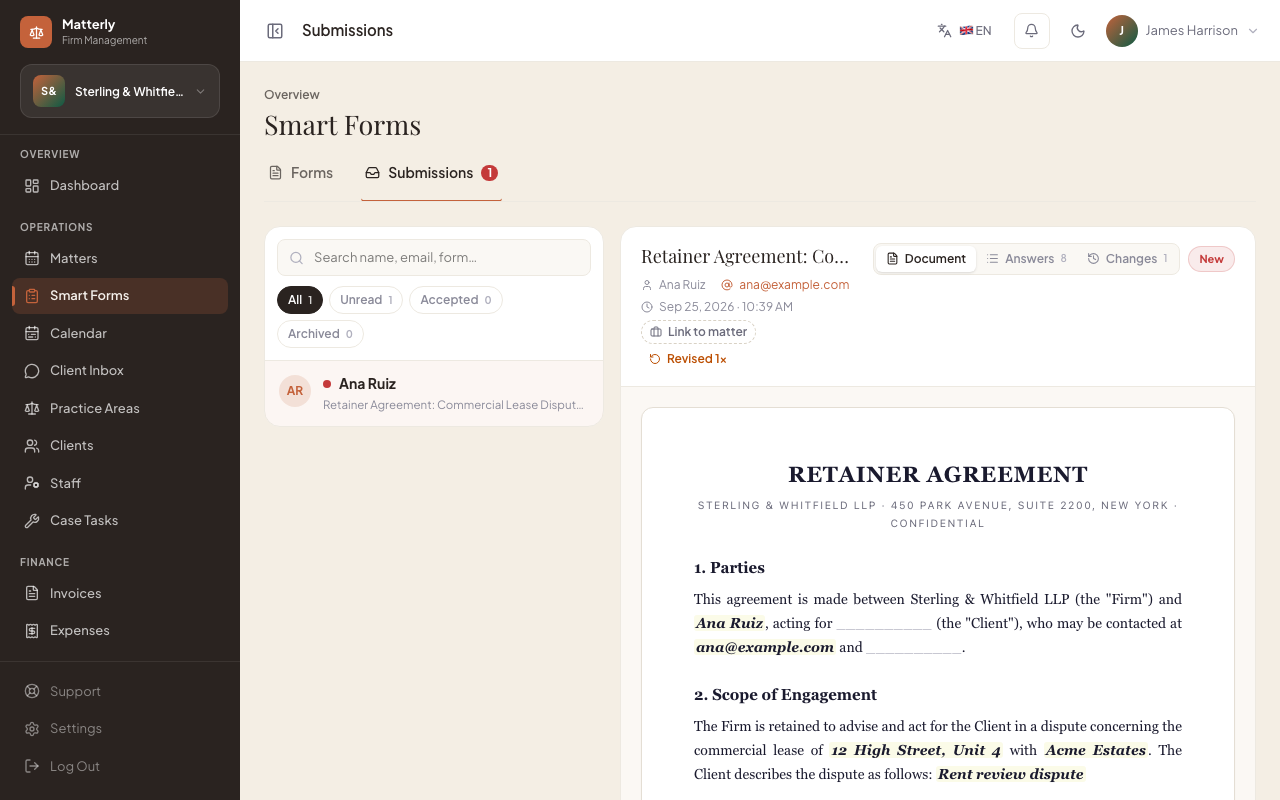
  4. Signed PDF on the matter
    4

    Signed PDF on the matter

    Answers and the e-signature come back as a PDF filed on the case.
02
Payments & invoicing

Take payments online

Connect Stripe, Razorpay, PayPal or LigdiCash and clients can pay the consultation fee when they book, or pay at your office instead. Invoices, payments and balances stay on the matter they belong to.

  • Stripe, Razorpay, PayPal and LigdiCash
  • Online checkout or pay at the office
  • Invoices and balances on every matter
03
AI Staff

AI drafts the work. You approve it.

Four agents prepare review replies, client updates, deadline plans and revenue notes. Their drafts wait in an approval inbox with a daily credit limit. Nothing is sent unless you approve it or turn on auto-send for that agent.

  • Review, client, case-task and revenue agents
  • Approve or edit drafts before they go out
  • Complete audit trail and daily spend cap
04
Website & client portal

A website that takes bookings

AI drafts a full firm site from a short brief. The chat widget answers questions, takes the client's details, opens the matter and sends a payment link. Clients then follow their matter in the client portal.

  • AI website, block editor and SEO copy
  • Books consultations from the chat and WhatsApp
  • Custom domain and client portal, by plan
05
Matter workspace

The case file on one screen

Tasks, billing, messages, forms, calendar and the activity history sit in tabs on the matter. Each staff member only sees the tabs their role allows. Drag a matter between the stages you define and the stage automations do the rest.

  • Six permission-gated tabs per matter
  • Stage automations: tasks, emails and texts
  • Progress bar in the client portal
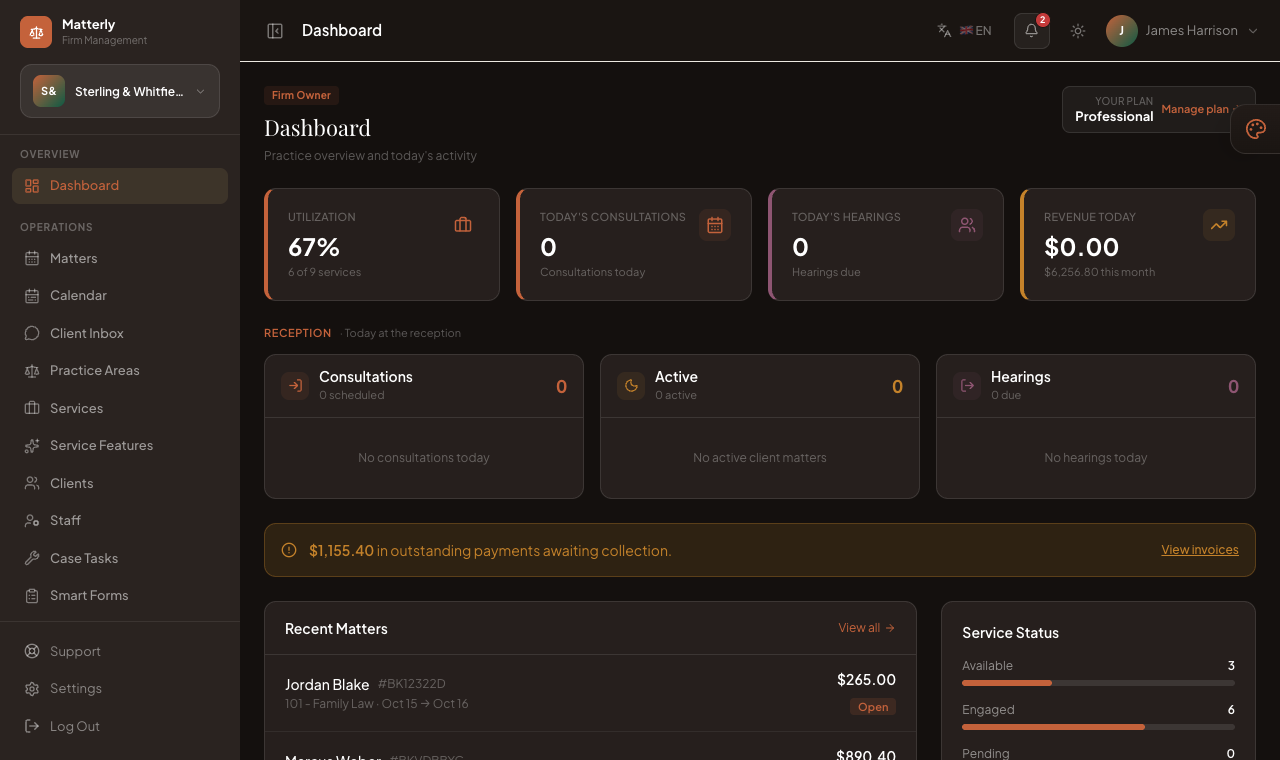
See your whole day when you sign in
Dashboard

See your whole day when you sign in

Today's consultations, upcoming hearings, active clients and revenue are on the dashboard as soon as you log in.

  • Live day view & caseload
  • Case tasks & deadlines
  • Invoices, payments & reports
All your matters on one calendar
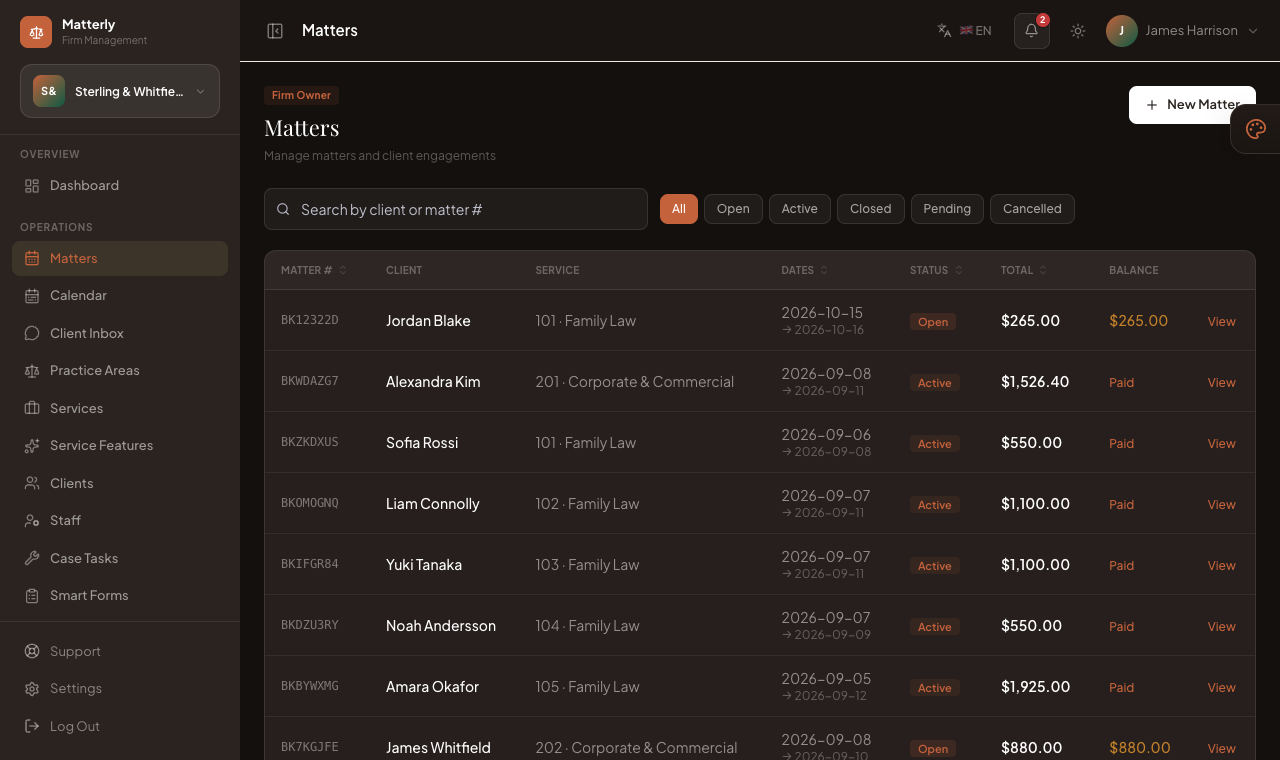
Matters

All your matters on one calendar

A colour-coded calendar shows what's open, what's scheduled and what's due to close over the next two weeks.

  • Practice-wide calendar
  • Practice areas & fees
  • Online consultation booking
Clients, invoices and payments on the matter
Clients & billing

Clients, invoices and payments on the matter

Add clients, take retainers, raise invoices and record payments. Every matter keeps its full history.

  • Client profiles & history
  • Stripe, Razorpay & PayPal
  • Branded client emails
AI built in

15 AI tools in the admin panel

Website copy, translation, fee suggestions, client replies and more. Every tool draws on the firm's monthly AI credits.

Website generator

Drafts a full firm website from a short brief.

Section writer

Rewrites any single section of a page on request.

SEO writer

Page titles and meta descriptions for search engines.

Translation

Translates your website pages and site text into your other languages.

Practice-area copy

Client-friendly descriptions of each practice area.

Smart Forms

Signable documents from one prompt.

Theme suggestions

Suggests colours and fonts that suit your firm.

Email writer

Confirmations, client updates and campaign emails.

Review responses

Professional replies to client reviews in your voice.

Review insights

Sums up what clients praise and what to improve.

Marketing generator

Social posts, ads and blog content on demand.

Fee advisor

Fee suggestions from the practice area, dates and your current workload.

Revenue insights

Plain-English summaries of your caseload and revenue.

Ask your data

Answers questions about your firm's numbers in plain English.

Chat assistant

Answers client questions and books consultations on your website and WhatsApp.

The full toolkit

What firms get

Case management, billing, a website builder and AI tools in one place. Some features depend on your plan, and AI tools use your monthly AI credits.

Practice management

  • Matter board & stages
  • Matters & calendar
  • Custom case fields
  • Client profiles & case tasks
  • Invoices & payments
  • Expenses & reports

Clients & website

  • Drag-and-drop website builder
  • Online consultation booking
  • AI client intake (web & WhatsApp)
  • Two-way client texts (SMS)
  • Custom domains & subdomains
  • Reviews & email campaigns

AI toolkit

  • Website & copy generator
  • Smart Forms & e-signatures
  • Fee advice
  • Review & email writer
  • Revenue insights
  • Para Chat assistant

Team & account

  • Staff roles & permissions
  • Client portal
  • AI Staff approval inbox
  • Multi-language & currency
  • Online subscription billing
  • Built-in support tickets
Pricing

Plans and pricing

Start small and move up a plan when you need more practice areas, staff seats or AI credits. No lock-in; turn off auto-renewal at any time.

Save with annual billing
Starter

Perfect for small firms

$29/month
  • 20 practice areas
  • 3 staff seats
  • 200 AI credits / mo
  • Website builder
  • AI tools & content
Get started
Enterprise

For multi-office firms

$199/month
  • Unlimited practice areas
  • Unlimited staff seats
  • Unlimited AI credits / mo
  • Website builder
  • AI tools & content
  • Client channels (WhatsApp)
  • Client portal
  • Custom domain
  • Priority support
  • API access
Get started

Every plan includes Smart Forms, matters and your firm website. Billed monthly or yearly by card, no setup fee. Need a multi-office setup? Contact us after signup.

FAQ

Common questions

If your question isn't here, send us a message.

[email protected]
Is LawyerPara an "AI lawyer"?

No. LawyerPara is an AI paralegal. It drafts, organises, reminds and follows up; a lawyer at your firm reviews and approves every document before a client signs it.

Who can see our firm's data?

Your firm. Matters, clients and documents live in your own workspace, kept separate from every other firm, and each staff member sees only the menus their role allows.

How do the AI tools work?

Each tool uses your monthly AI credits. AI Staff drafts wait in an approval inbox; nothing goes out unless you approve it or turn on auto-send for that agent.

Which payment methods can clients use?

Stripe, Razorpay, PayPal and LigdiCash online, or pay at the office. Every payment is recorded on the matter.

Can we use our own domain and language?

Yes. Custom domains come with the Professional plan and above. English, French, Spanish and German are included, and you can add more from the translation editor.

How long does setup take?

Under an hour. Sign up, add your practice areas, let AI draft the website, and send your first Smart Form the same day. Nothing to install.

How does billing work?

Monthly or yearly, by card. Every plan comes with a free trial and no setup fee. You can change plans or turn off auto-renewal at any time from your account.

Can we buy the software and host it ourselves?

No. LawyerPara is a subscription service. We run it, keep it updated and back it up, so your firm only pays for the plan it uses.

Try LawyerPara with your own firm.

Set up your practice areas, publish your website and see how your AI paralegal fits your work. The trial does not need a credit card.