Website Builder
#Overview
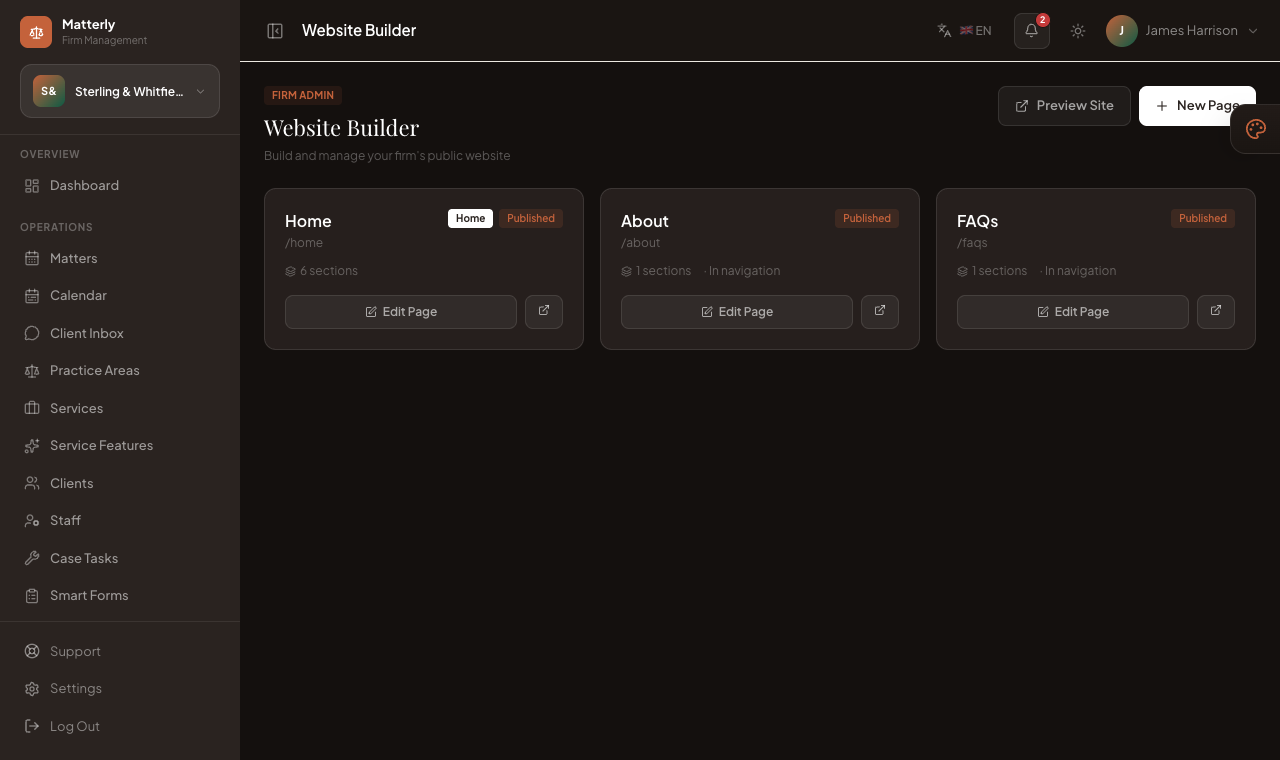
Website Builder (/admin/website) lets you build and manage the firm’s public website with block-based pages.
#Features
- Page list with published / draft status
- Block counts per page
- Preview Site for the live client site
- + New Page to add content
- Edit Page and open external link
#Workflow
- Open Website Builder.
- Click + New Page or Edit Page on Home / About / FAQs.
- Arrange blocks in the editor.
- Publish when ready.
- Use Preview Site to review the client experience.
#SEO
Each page's SEO & AI discovery panel holds the title and description search engines show, with a tab for every
language the site offers. Write SEO with AI drafts both from the page content.
- Leave a field empty and LawyerPara uses the page's opening text instead, then a sentence built from the firm name and
city.
- Every page gets exactly one main heading. The hero block provides it; on a page without a hero, the first block
heading becomes the main heading.
- The share image for links on LinkedIn, WhatsApp and similar comes from the page's first photo, falling back to the
home page hero photo.
See SEO & Search Visibility for languages, sitemaps and custom domains.
#Notes
#Best Practices
- Add real photos before publishing.
- Match page copy to your service types and rates.
- Test matter from the public site after changes.
- Fill in the SEO title and description for each page in every language you enable.
- Check the site on a phone after changes: menus, booking and forms are built to work at 375px wide.