End User Guide: Invoice Workflow
LawyerPara has two invoice concepts:
| Type |
Who bills whom |
Where |
| Client invoice |
Firm → Client |
Firm Admin → Invoices |
| Platform invoice |
Platform → Firm |
Super Admin → Invoices |
This chapter covers both.
#Client invoices (Firm Admin)
#Purpose
Bill the client for the matter and disbursements.
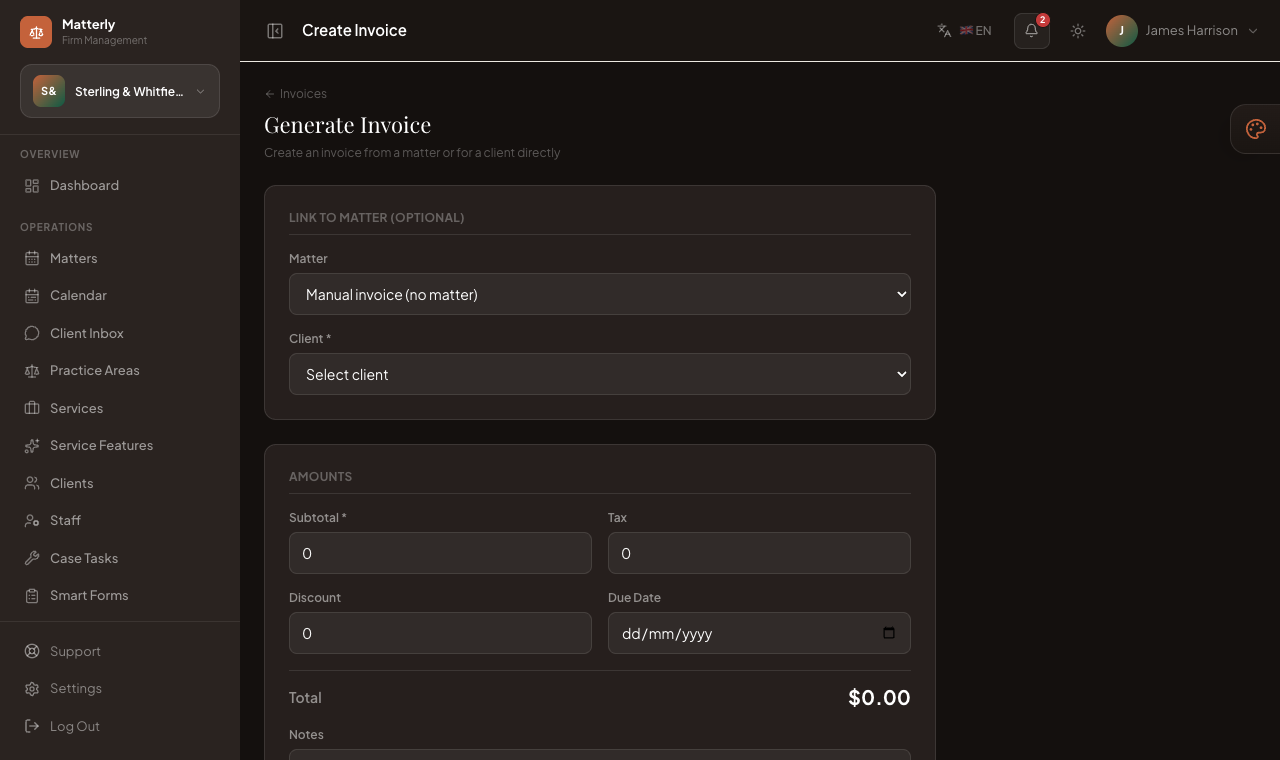
#Generate invoice
Invoices are often created automatically when a matter is created.
You can also:
- Go to Invoices → Create.
- Link a matter (or client).
- Enter subtotal, tax, discount, due date, notes.
- Save it, usually as Draft.
#Draft
- Draft invoices are internal.
- Review line items and totals before sending.
#Generate & Send / Send Invoice
- Open the invoice.
- Click Send (or Re-send).
- Status moves toward Sent.
- Client receives the Invoice email if they have an email and SMTP is working.
#Record payment
- Open the invoice.
- Record Payment: amount + method.
- Status becomes Partially paid or Paid.
#Download PDF
Use Download PDF / PDF link on the invoice page to print or attach manually.
#Email customer
Sending the invoice is the built-in way to email the customer. Re-send if they did not receive it. Confirm SMTP under Super Admin → Settings → Email.
#Client invoice status guide
| Status |
Meaning |
| Draft |
Not sent yet |
| Sent |
Emailed / issued to client |
| Overdue |
Past due (when tracked) |
| Partially paid |
Some money received |
| Paid |
Fully settled |
Filters on the invoices list help you find unpaid vs paid invoices.
#Purpose
Bill a firm for subscription or platform charges.
#Workflow
- Open Super Admin → Invoices (or create from Subscriptions).
- Choose the firm and line items.
- Apply a coupon if available.
- Save draft or Generate & Send to email the firm.
- Track paid vs outstanding.
Platform invoice email uses the platform mailer (separate from client invoice templates).
#Payment methods (client)
When recording payment you can use methods such as:
- Cash
- Card
- Bank transfer
- UPI
- Stripe / Razorpay / PayPal / LigdiCash
- Other
Online checkout methods must be enabled under Firm Settings → Payments with valid keys.
#Related pages